My Finance Tracker Journey: From Workflows to Agents
Last year, I wanted to understand my spending without recording every transaction myself. I tried many bookkeeping apps and websites. Most required manual entry; others accepted only a fixed CSV or Excel template. Custom shortcuts made entry faster, but the records already existed in my financial accounts.
I decided to build FinanceTracker: upload transaction exports, clean them, and review a unified table and charts.
From local scripts to a web app
I started with local Python scripts for importing and cleaning exports. They stored transactions in SQLite, and a Streamlit dashboard let me explore the results.
As the project grew, I considered an AI skill, but chose a familiar web interface because I did not expect every user to install and use skills. The financial services I used offered exports even when direct integration was unavailable. My goal was to accept varied CSV, Excel, and PDF layouts without making users reformat them first.
Over several rounds with my AI coding agent, I built, polished, and deployed the app. I liked using it. The difficult part was making inconsistent exports comparable: finding tables, mapping columns, normalizing values, and recognizing duplicated or offsetting transactions.
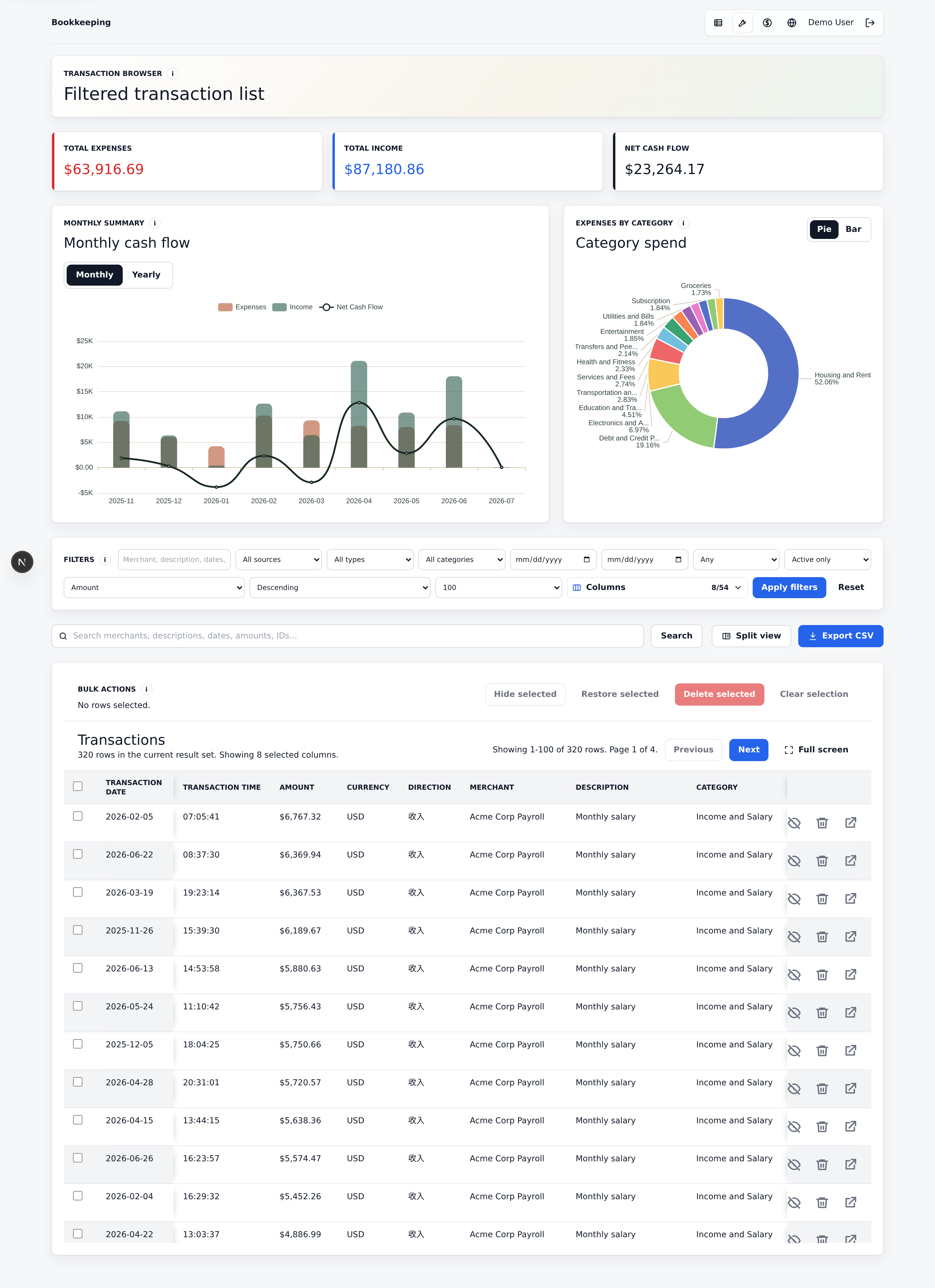
The web interface, shown with demo data. Click for the full view, including filters and the transaction table.
The current architecture
The app uses Next.js and React for uploads, transaction review, and ECharts dashboards; FastAPI for authenticated APIs; PostgreSQL for the ledger, accounts, import history, and audit records; MinIO/S3 for source files; and Redis/RQ for background processing.
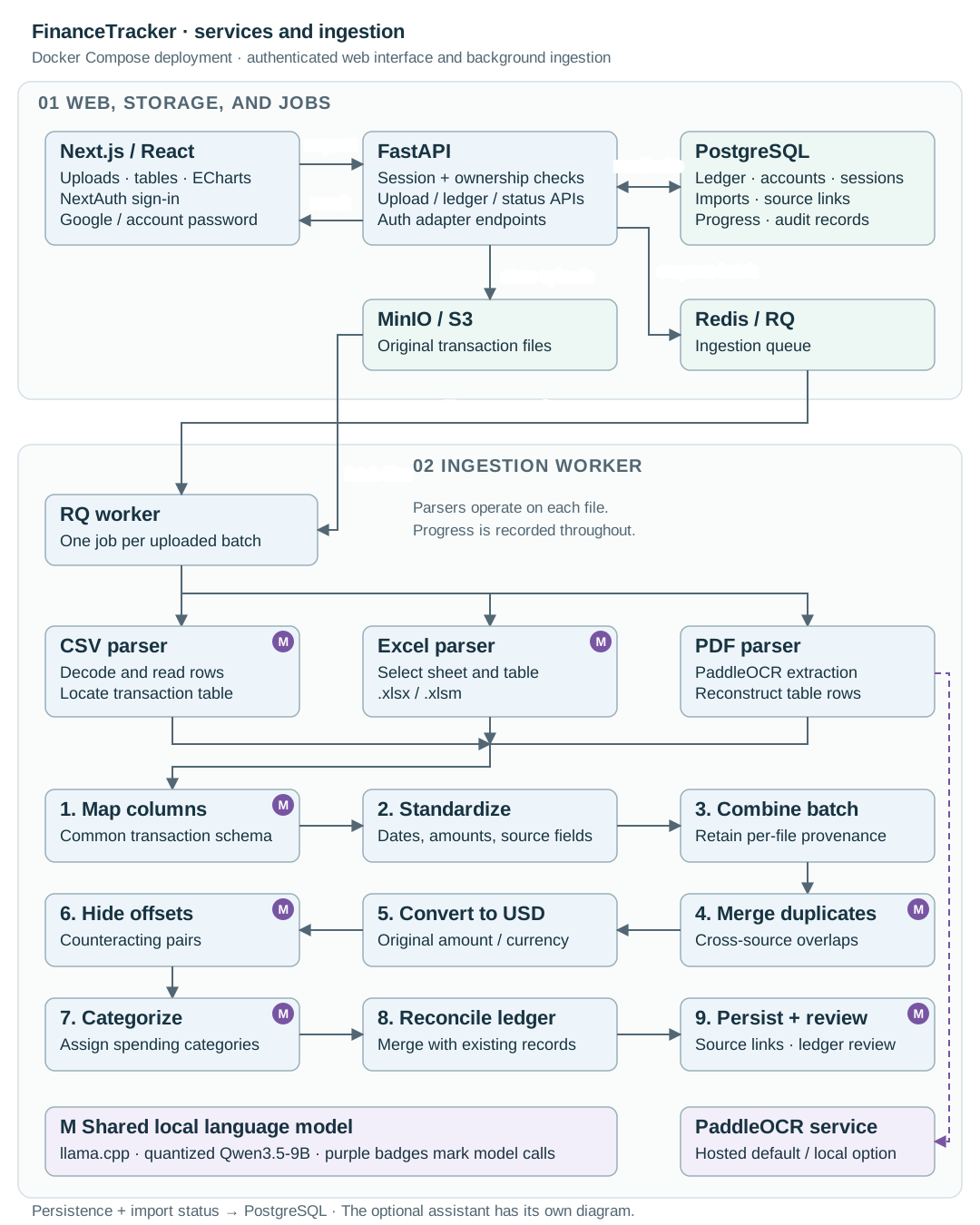
The current service architecture and ingestion stages. Click to enlarge.
Each upload batch becomes one ingestion job. CSV and Excel parsers use a model to locate the transaction table; PDF extraction uses PaddleOCR. Each file is mapped and standardized before the combined batch passes through duplicate merging, USD conversion, offset detection, and categorization. Reconciliation with the existing ledger preserves source links and reviews ledger-wide offsets and categories.
A quantized Qwen3.5-9B runs locally through llama.cpp for table detection, mapping, and classification decisions. PaddleOCR supports a local service, although the current default uses its hosted API. The pipeline follows stages I defined; models help resolve ambiguity within them.
An assistant when I need custom changes
Some descriptions need personal context. Instead of adding a control for every possible rule, I added an assistant that turns a request into SQL—for example, recategorizing a merchant’s transactions during a particular month.
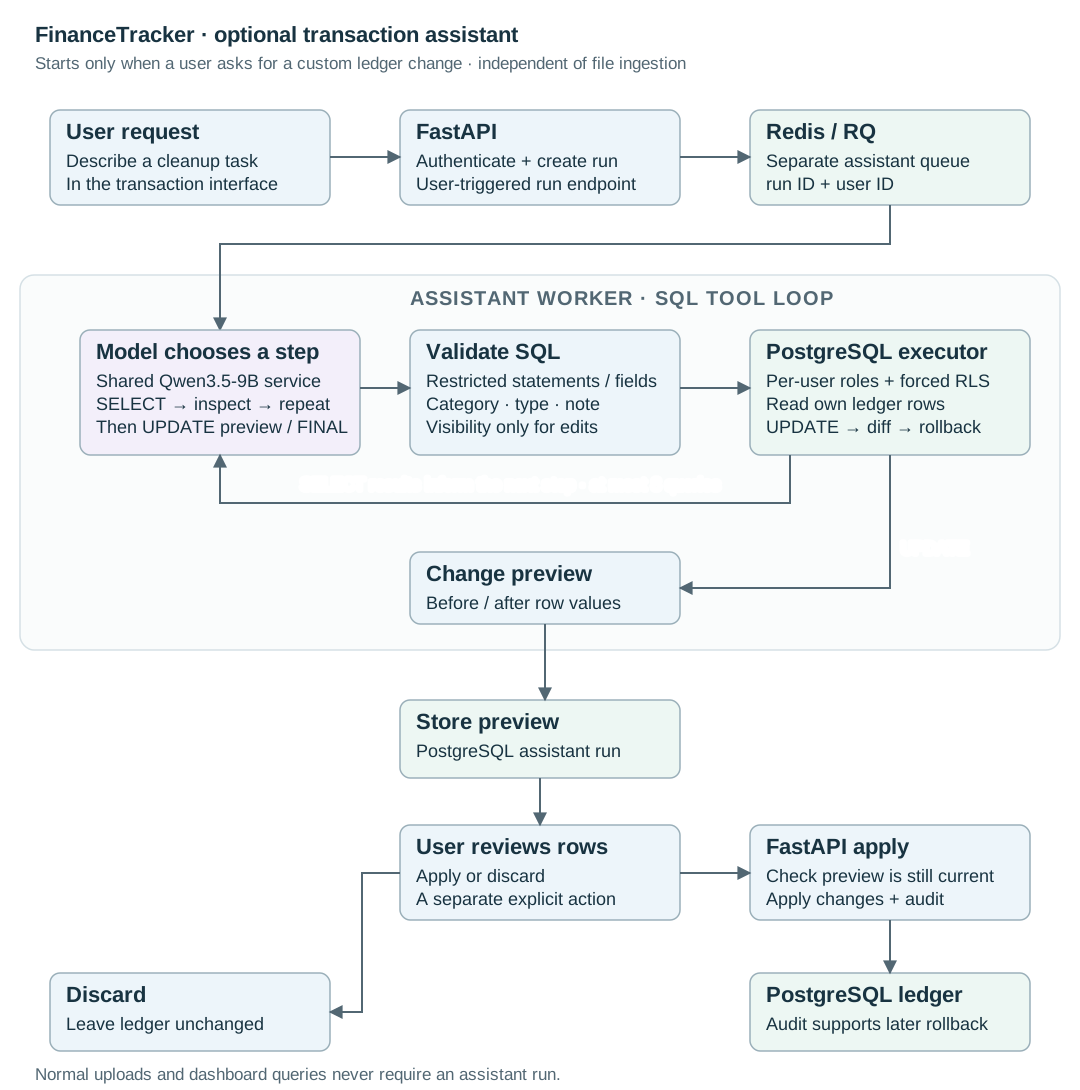
This worker runs only on request. Imports and dashboards work independently of it. Click to enlarge.
The assistant can query my rows, inspect results, and propose changes to categories, transaction types, notes, or visibility. SQL validation and database permissions constrain its actions. An update produces a before-and-after preview without committing it. I then apply or discard the changes; applied changes have an audited rollback path. It works reasonably well for cleanup I can describe more easily than configure.
The project alongside model releases
The project evolved alongside a series of new model releases:
| Date (2026) | Model releases | My project and usage |
|---|---|---|
| Feb 5 | Claude Opus 4.6 and GPT-5.3-Codex: longer agentic work and stronger coding. | |
| Mar 2 | Qwen3.5-9B. | |
| Mar 5 | GPT-5.4, with native computer use in Codex. | |
| Mar 11–13 | Set up the project and brief, refined the local Python/SQLite/Streamlit prototype with Cursor, and saved it to Git. | |
| Mar 14–21 | Added PaddleOCR and Qwen3.5-9B; improved table detection, duplicate merging, and categorization; supported local and hosted models. | |
| Mar 24–29 | Replaced Streamlit with Next.js and FastAPI for interactive charts, transaction editing, and duplicate review. | |
| Apr 3–23 | Added sign-in, PostgreSQL, object storage, and background jobs; deployed on my home server, adopted hosted OCR, and prepared v1.0. | |
| Apr 23 | GPT-5.5 for coding, computer use, and knowledge work. | |
| May 7–22 | Asked Codex to work through the backlog with less supervision; released 2.0. | |
| Jul 9 | GPT-5.6 family, with programmatic tool calling. | |
| Jul 14 | Implemented and began testing an on-demand ledger assistant with SQL queries, change previews, and user review. | |
| Jul 15 | Tried ChatGPT with Drive exports for cleanup and merging, then Google Sheets tables and charts. |
The agent may become the central interface
The July experiment made this concrete: I asked ChatGPT to process exports in Drive and put the results in Google Sheets, then requested more cleanup and charts. I still had to catch mistakes in categories, refund calculations, and a chart range. But a general agent coordinated much of the work I had built a dedicated app to perform.
As AI became better at using tools and carrying a task across steps, I started seeing it as a more general application interface. My lesson is that ChatGPT, Claude, and similar agentic apps may remain central to how people use future software if services expose useful APIs. Users could state a goal in one place while the agent works across storage, bookkeeping, and visualization tools.
That changes what I want to build. A dedicated app still provides a persistent ledger and predictable review controls. Its APIs could also let a general agent use those capabilities. I now ask which parts of a project need their own interface, and which should be accessible from the assistant people already use.